वीडियो एडिटिंग क्या हैं।
आज के समय में YouTube Shorts, Instagram Reels, Facebook Videos, Online Courses और Marketing Ads का दौर चल रहा है। हर कोई वीडियो कंटेंट बना रहा है। लेकिन असली समस्या तब शुरू होती है जब आपको एक वीडियो को प्रोफेशनल तरीके से Edit करना पड़ता है।
अगर आपने कभी वीडियो Editing की है, तो आप जानते होंगे कि एक simple 5 मिनट की वीडियो edit करने में कई घंटे लग जाते हैं। Background remove करना, subtitles डालना, transitions लगाना, voice clean करना, color correction करना — ये सब काम beginners के लिए काफी मुश्किल और time-consuming हो सकता है।
अब imagine कीजिए कि आपके पास ऐसा AI Tool हो जो सिर्फ कुछ clicks में आपके video को automatically edit कर दे। Music sync कर दे, unwanted pauses हटा दे, subtitles generate कर दे, camera cuts बना दे और social media optimized video तैयार कर दे।
यही कारण है कि AI Video Editors 2026 में तेजी से trend कर रहे हैं।
आज AI सिर्फ editing नहीं कर रहा, बल्कि पूरा video production workflow बदल रहा है। चाहे आप YouTuber हों, Freelancer हों, Social Media Creator हों, Online Teacher हों या Business Owner — AI Video Editors आपके काम को 10x fast और professional बना सकते हैं।
इस article में हम जानेंगे:
- Best AI Video Editors 2026
- Features
- कैसे Use करें
- कौन सा Tool किसके लिए Best है
- Pricing और Comparison
- Expert Tips
- Real User Cases
अगर आप 2026 में smart तरीके से वीडियो editing करना चाहते हैं, तो यह guide आपके लिए बेहद useful होने वाली है।
विषय सूची (Table of Contents)
AI Video Editors क्या होते हैं?
2026 में AI Video Editing इतना Trending क्यों है?
Best AI Video Editors 2026
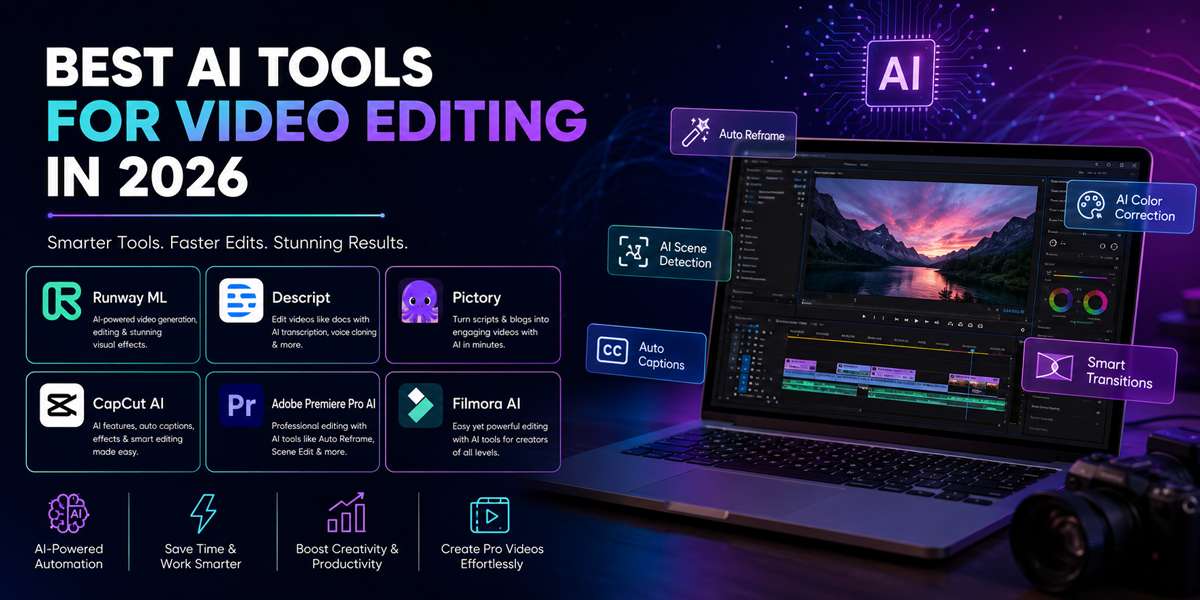
Runway ML
Descript
Pictory
CapCut AI
Adobe Premiere Pro AI
Filmora AI
AI Video Editors के Powerful Features
AI Video Editor कैसे Use करें?
Pros & Cons
Pricing और Packages
कौन लोग इन Tools का Use करें?
Best Alternatives Comparison
My Opinion & Expert Tips
Conclusion
FAQs
AI Video Editors क्या होते हैं?
AI Video Editors ऐसे software tools होते हैं जो Artificial Intelligence की मदद से video editing process को automate करते हैं।
पहले video editing में manual काम ज्यादा होता था:
- Clip cutting
- Audio syncing
- Subtitle adding
- Noise reduction
- Background removal
- Scene transitions
लेकिन अब AI इन कामों को खुद automatically कर सकता है।
Example:
अगर आप एक talking-head YouTube video upload करते हैं, तो AI tool automatically:
- Silences remove कर देगा
- Captions generate कर देगा
- Background music add कर देगा
- Camera zoom effects लगा देगा
- Highlight moments detect कर देगा
यानि जो काम पहले 4-5 घंटे में होता था, वही अब 15-20 मिनट में हो सकता है।
2026 में AI Video Editing इतना Trending क्यों है?
1. Short Video Content Explosion
आज हर platform short-form videos को push कर रहा है:
- Instagram Reels
- YouTube Shorts
- TikTok
- Facebook Reels
Creators को fast content production चाहिए।
2. Businesses को Faster Marketing चाहिए
Small business owners अब AI tools से:
- Product Ads
- Promotional Videos
- Explainer Videos
- Social Media Content
बहुत जल्दी बना रहे हैं।
3. Editing Skill की जरूरत कम हो गई
पहले Premiere Pro सीखने में महीनों लगते थे।
अब AI Tools beginners को भी professional results दे रहे हैं।
4. Time Saving
AI repetitive tasks automate कर देता है।
Example:
- Auto subtitles
- Auto transitions
- Auto resize
Auto cuts
5. AI Avatars और AI Voiceovers
अब आपको camera पर आने की भी जरूरत नहीं।
AI avatars और AI voices पूरे videos बना सकते हैं।
Best AI Video Editors 2026
1. Runway ML
What is Runway ML?
Runway ML एक advanced AI video editing platform है जो creators को cinematic AI-powered editing experience देता है।
यह tool खासकर:
- AI video generation
- Background removal
- Motion tracking
- Text-to-video
- Object removal
के लिए famous है।
Key Features
AI Background Removal
Green screen की जरूरत नहीं।
AI automatically background remove कर देता है।
Text-to-Video Generation
आप सिर्फ prompt लिखकर video generate कर सकते हैं।
Example:
“Create futuristic cyberpunk city animation”
Motion Tracking
Objects automatically track हो जाते हैं।
AI Video Expansion
Video frames को expand कर सकता है।
Best For
Filmmakers
YouTubers
Creative agencies
Ad creators
2. Descript
What is Descript?
Descript एक AI-powered video और podcast editor है।
यह text-based editing system use करता है।
मतलब आप video को text document की तरह edit कर सकते हैं।
Key Features
• Edit Video by Editing Text
अगर आप text delete करेंगे,
तो video का वही part remove हो जाएगा।
• AI Voice Clone
आपकी आवाज clone कर सकता है।
• Auto Captions
Automatic subtitles generate करता है।
• Filler Word Removal
“Umm”, “Ahh” जैसे words remove कर देता है।
Best For
- Podcasters
- Course creators
- Interview editors
- YouTubers
3. Pictory
What is Pictory?
Pictory एक AI tool है जो article, script या blog को video में convert करता है।
अगर आप content creator हैं तो यह tool काफी powerful है।
Key Features
• Blog to Video
Article paste करें,
AI video बना देगा।
• Auto Visual Matching
AI relevant stock footage add करता है।
• Voiceover Integration
AI voiceovers support करता है।
• Social Media Video Creation
Short videos create कर सकता है।
Best For
- Bloggers
- Affiliate marketers
- Social media creators
4. CapCut AI
What is CapCut AI?
CapCut आज सबसे popular AI editing apps में से एक है।
Short-form content creators इसे बहुत ज्यादा use करते हैं।
Key Features
One Click Auto Edit
AI खुद transitions और effects add करता है।
• AI Captions
Stylish subtitles generate करता है।
• AI Remove Background
Instant background remove।
• Trending Templates
Viral reel templates available।
Best For
- Instagram creators
- Reels editors
- Beginners
- Mobile editors
5. Adobe Premiere Pro AI
What is Adobe Premiere Pro AI?
Adobe ने अपने Premiere Pro में AI features integrate किए हैं जिन्हें Adobe Sensei कहा जाता है।
Key Features
• AI Scene Edit Detection
Automatic scene cuts detect करता है।
• Auto Reframe
Different aspect ratios automatically generate करता है।
• Speech Enhancement
Voice quality improve करता है।
• AI Color Correction
Smart color grading।
Best For
Professional editors
Agencies
Studios
6. Filmora AI
What is Filmora AI?
Filmora beginners के लिए सबसे user-friendly AI video editor माना जाता है।
Key Features
• AI Smart Cutout
Object removal आसान।
• AI Thumbnail Creator
YouTube thumbnails generate करता है।
• AI Copywriting
Video titles और captions suggest करता है।
• AI Music Generator
Automatic music generation।
Best For
- Beginners
- YouTubers
- Freelancers
AI Video Editors के Powerful Features
1. Auto Subtitle Generation
AI speech को detect करके captions बनाता है।
यह YouTube और Reels engagement बढ़ाने में मदद करता है।
2. AI Voice Enhancement
Background noise remove करके clean audio देता है।
3. AI Scene Detection
Video scenes automatically detect करता है।
4. Text-to-Video
Text prompts से videos create करना।
5. AI Avatar Videos
Virtual presenters create करना।
6. Auto Resize for Social Media
Landscape video को vertical format में convert करना।
AI Video Editor कैसे Use करें? (Step-by-Step Guide)
Step 1: Tool Select करें
अपने जरूरत के हिसाब से tool चुनें।
Example:
- Reels → CapCut
- Professional Editing → Premiere Pro
- AI Generation → Runway ML
Step 2: Account Create करें
Official website पर जाकर signup करें।
Step 3: Video Upload करें
अपनी raw clips upload करें।
Step 4: AI Features Apply करें
अब AI tools use करें:
- Auto captions
- Background removal
- AI transitions
Noise reduction
Step 5: Music Add करें
Royalty-free music select करें।
Step 6: Export Settings Choose करें
- YouTube → 1080p
- Reels → Vertical format
- Ads → High quality MP4
Step 7: Final Export करें
अब आपका professional AI-edited video तैयार है।
Pros & Cons
| Pros | Cons |
| Editing बहुत fast हो जाती है | कुछ tools expensive हैं |
| Beginners भी use कर सकते हैं | Internet dependency |
| Auto subtitles और AI effects | Manual control कम |
| Time saving | High-end AI features paid होते हैं |
| Social media optimized | AI mistakes possible |
Pricing & Packages (2026)
| Tool | Starting Price |
| Runway ML | लगभग ₹1200/month |
| Descript | लगभग ₹1000/month |
| Pictory | लगभग ₹1500/month |
| CapCut | Free + Paid Plans |
| Premiere Pro | लगभग ₹1700/month |
| Filmora | लगभग ₹800/month |
कौन लोग इन Tools का Use करें?
1. YouTubers
Fast editing और subtitles के लिए।
2. Instagram Creators
Viral reels बनाने के लिए।
3. Freelancers
Clients के videos जल्दी deliver करने के लिए।
4. Online Teachers
Course videos और lectures बनाने के लिए।
5. Small Business Owners
Marketing ads और product videos के लिए।
Expert Tips for Better AI Video Editing
1. AI पर पूरी तरह depend मत रहें
Manual editing touch हमेशा जरूरी होता है।
2. Good Audio सबसे Important है
AI खराब audio को पूरी तरह fix नहीं कर सकता।
3. Short Videos ज्यादा Perform करते हैं
30-60 seconds content ज्यादा viral होता है।
4. Captions जरूर Use करें
Most users muted videos देखते हैं।
5. AI Templates का Smart Use करें
Over-effects audience को distract कर सकते हैं।
Conclusion
2026 में AI Video Editors सिर्फ optional tools नहीं रहे, बल्कि content creation industry का core part बन चुके हैं।
आज creators को:
- Faster workflow
- Better quality
- More content production
- Less manual work
की जरूरत है, और AI tools यही काम कर रहे हैं।
अगर आप YouTube, Instagram, freelancing, marketing या online business में हैं, तो AI Video Editors सीखना आपके लिए game changer साबित हो सकता है।
Beginners के लिए:
- CapCut AI
- Filmora AI
Best हैं।
Professionals के लिए:
- Runway ML
- Premiere Pro AI
बेहतर options हैं।
अब समय है smart editing workflow अपनाने का।
FAQs (Frequently Asked Questions)
1. क्या AI Video Editors beginners के लिए अच्छे हैं?
हाँ, आज के AI tools beginners को भी professional editing करने में मदद करते हैं।
2. क्या AI पूरी video automatically edit कर सकता है?
कुछ हद तक हाँ। लेकिन final polishing के लिए manual editing अभी भी जरूरी है।
3. सबसे अच्छा free AI Video Editor कौन सा है?
CapCut AI beginners के लिए सबसे popular free option है।
4. क्या AI subtitles automatically generate कर सकता है?
हाँ, लगभग सभी modern AI editors auto captions support करते हैं।
5. क्या AI Video Editing mobile पर possible है?
हाँ, CapCut और Filmora जैसे tools mobile support देते हैं।
6. क्या AI tools YouTube videos बना सकते हैं?
हाँ, कई AI tools script-to-video और text-to-video support करते हैं।
7. क्या AI Video Editors professional work के लिए suitable हैं?
हाँ, Runway ML और Adobe Premiere Pro जैसे tools professional studios में use हो रहे हैं।
8. AI Video Editing सीखने में कितना समय लगता है?
Basic AI editing 2-3 दिनों में सीखी जा सकती है।
Advanced workflow सीखने में कुछ हफ्ते लग सकते हैं।